


Flowbird Parking
3.81.24K Reviews
App Specs
- Version
- 3.17.2
- Updated On
- License
- Free
- Downloads
- 1,000,000+
- Developer
- Flowbird
- Categories
- Auto & Vehicles
- Platform
- Android, iOS
Screenshots
 Analysis by AppCompare
When several people in a household take turns driving the same car, parking can become a small coordination problem: one person is trying to pay while another is already walking away, or the driver has to remember where the parking session was started. Flowbird Parking is a mobile parking app from Flowbird, and I find its strongest appeal is the chance to handle a parking session on a phone instead of relying entirely on a meter. That can make a busy stop feel less awkward, but it works best when the person at the curb takes responsibility for the session and checks the details before leaving the vehicle.
A useful option when drivers share a car
Picture a household member dropping someone off downtown, then heading into a shop while the other person takes over the errand. A phone-based payment can spare the driver a search for coins or a return trip to a meter, and the person who started the session can keep an eye on its timing. The practical catch is that the person using the app should be the one who knows which vehicle and parking location are involved. I would not treat a shared phone or a remembered payment method as a substitute for agreeing who is handling the parking that day.
That boundary matters because convenience depends on getting the session details right. If one family member pays and another later moves the car, the second driver should not assume the first session automatically follows them to a different space or location. I would check the active parking details before anyone walks away, and make sure the person responsible knows when the session is due to end. These are simple habits, but they prevent the common household mix-up of assuming someone else has taken care of the meter.
Keep account and payment responsibility clear
The app’s payment flow is designed to reduce repeated entry, which is handy for the regular driver. In a shared-device situation, though, saved payment details make it especially important to know whose account is open and who is authorizing the parking charge. I would avoid passing a logged-in phone around casually; instead, agree on one person to start the session, or have each regular driver use their own account and device if that suits the household. That is not extra bureaucracy: it makes it easier to identify who can extend a session or resolve a payment issue.
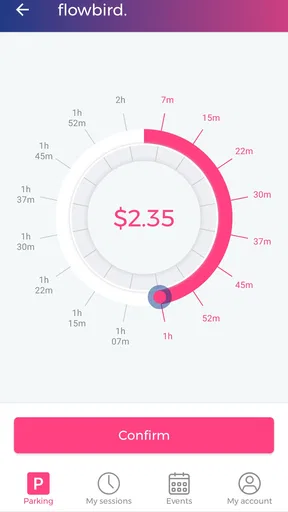
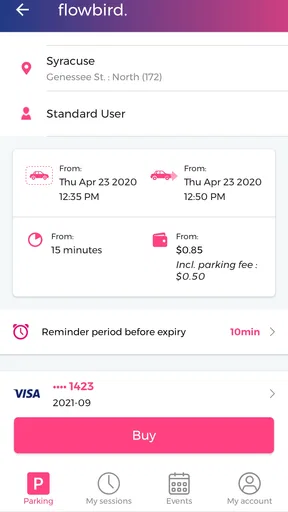
Flowbird is free to install, but parking itself is not thereby free; the cost depends on the parking choice shown when you use the app. Before confirming, I would check the location, duration, and displayed amount rather than tapping through on autopilot. That small pause is particularly useful when someone else has handed you the phone or when you are parked in an unfamiliar part of town. It also makes the app a more sensible choice than guessing at a meter’s instructions while traffic or passengers are waiting.
How the app fits everyday parking
I find Flowbird Parking most useful when a trip involves a quick stop and I want to sort out payment without returning to a meter. In the next section, I’ll look at how that convenience fits into an ordinary routine—and why checking the curbside signs still matters before I start a session.
Simple navigation, with a local check still needed
So, what’s the deal with Flowbird Parking? Essentially, it’s a mobile app that takes the hassle out of finding and paying for parking. No more fumbling for coins or trying to decipher confusing parking meters. With just a few taps, you can locate a spot, pay for it, and even extend your parking time remotely. How cool is that?
Worth Reading Before You Choose

EA SPORTS FC Mobile 26 Is a Bigger Football Game, but It Takes Time

Flipboard Shows What News Apps Must Do Beyond the Feed

Switching to Android Auto Means Rethinking Your Driving Routine

Google Calendar Makes a Crowded Week Easier to Manage

Ludo King Makes the Most of the Minutes Between Plans

Baby Panda World Brings Quick Play to Modern Phones, but Its Game Library Feels Busy
Easy Navigation
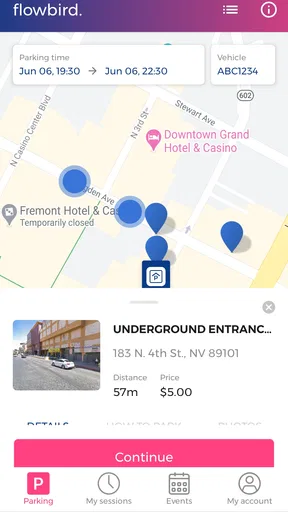
The interface is sleek and straightforward, which I really appreciated. The app opens up to a map displaying available parking spaces around your location. You can filter these based on various preferences like distance or price. It’s almost like having a personal parking assistant right in your pocket.
Even with a map, I would treat the screen as a starting point rather than permission to park anywhere nearby. The sign beside the space is the final practical check: confirm that the zone and restrictions match what you are selecting in the app. This is a useful habit when streets have several parking areas close together, or when you have driven a few blocks from the place you first searched. A quick comparison between the curbside sign and the app can prevent a misplaced session.
For an ordinary errand, I would open the map before getting out of the car, narrow the choices by distance or price, then verify the exact space after parking. That sequence is more reliable than trying to sort everything out while standing in a hurry. Filters help with choosing between visible options, but they do not remove the driver’s responsibility to read the local rules. If your destination has a dedicated parking system or a meter that is easier to use, that may be the better option for that particular stop.
Smooth Payment Options
One of my favorite features is the seamless payment process. You can link your credit card or use digital wallets. Plus, it saves your payment details for future use, so you don’t have to enter them every time. It’s all about convenience, and Flowbird nails it here.
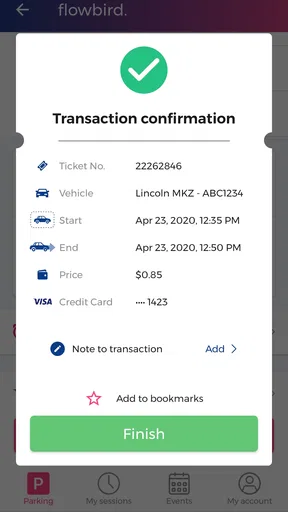
The trade-off is that a quick payment can encourage a quick glance at the wrong detail. I would make a deliberate final check of the selected location and parking duration before confirming, especially if I am using the app in a new neighborhood. If the household has more than one regular driver, deciding in advance whose account will be used also avoids uncertainty about receipts and who is expected to manage an extension. That routine is more useful than trying to reconstruct the session later.
Real-Time Updates
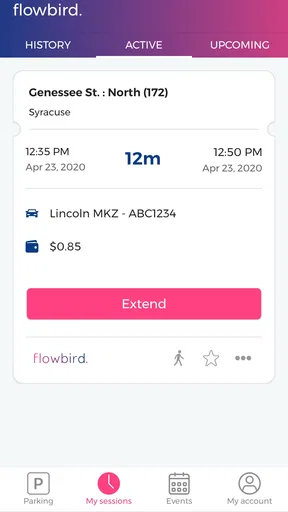
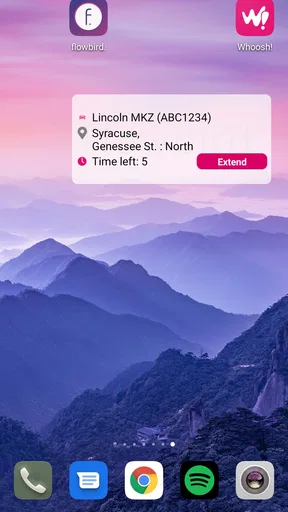
I was also impressed by the real-time updates. The app notifies you when your parking time is about to expire, allowing you to extend it if necessary. This feature is a game-changer, especially when you’re in a meeting or just enjoying a coffee, and you lose track of time.
I would still use the alert as a prompt, not as a guarantee that I can remain parked. An extension is only helpful when the location and parking rules allow it, so I would check what the app offers before relying on extra time. For a meeting that may run long, the sensible move is to choose an appropriate initial duration and keep the phone available for a reminder. For a short errand with a firm end time, the alert may matter less than choosing the correct session at the start.
Details that can change the choice
Beyond the basics, Flowbird offers some extra perks that enhance the overall experience. For instance, you can find detailed information about each parking spot, including height restrictions and available amenities. It’s all about making your parking experience as smooth as possible.
Those details are most useful when the car or trip has a specific constraint. If I am driving a taller vehicle, checking a height restriction before committing can save a frustrating detour. Amenities can also help distinguish one option from another when a passenger has limited mobility or needs a particular kind of stop. I would use these details to rule out unsuitable choices, while still checking signs and conditions on arrival because parking information on a screen cannot replace what is posted at the space.
Where it stands against familiar alternatives
Compared with feeding a meter directly, a phone app is more convenient when you want to pay from the car or keep track of time without returning to the curb. Compared with using a different parking app, the deciding factor is often whether the place you need is covered and whether its zone details match the signs. I would not install any parking app on the assumption that it works for every city or every space; the map and payment options need to be useful where you actually park.
A meter may be the clearer choice if your phone battery is nearly empty, connectivity is unreliable, or you prefer not to store payment details in an app. Cash or a card at the machine can also be simpler for a one-off stop if the machine is easy to use. Flowbird makes more sense for repeat trips to areas where its parking options appear in the app, particularly when remote time management is valuable. I would keep the meter as a practical fallback rather than treating the app as a universal replacement.
Who is likely to appreciate it
I see the best fit as a driver who regularly parks in places supported by the app and wants a quick way to pay and monitor a session. It can also suit a household where one person handles most parking payments and can keep track of the vehicle, location, and expiry time. People who value checking nearby choices on a map may find that more convenient than walking from a meter to compare options.
It is less compelling for someone who rarely parks in app-supported areas, dislikes mobile payments, or prefers not to manage parking from a phone. It may also be a poor match if the driver expects a map to settle every question about legality or availability. My practical recommendation is to check whether your regular destinations show usable options before making it part of your routine. A parking app earns its place through repeated usefulness, not simply because paying by phone sounds easier.
Age, trust, and household coordination
The app is rated for everyone, but I would still keep payment decisions with the person responsible for the car or household account. A younger passenger can help read a sign or remind the driver about the time, but the adult or account holder should confirm the location and charge. That keeps the task understandable without assuming the app provides special family accounts or controls.
Flowbird has a 3.7 average from around 48,000 ratings, with more than a million installs. I take that as a reason to set expectations realistically: it is a widely used parking tool, but people’s experiences can differ depending on their local parking options and the clarity of the zones they encounter. The app is free, and the current version is 3.16.1; it supports devices running Android 7.1 or later. Those details make it easier to judge whether it fits an older phone and the way your household handles parking.
Is It Worth It?
After using Flowbird Parking for a few weeks, I can confidently say it’s a must-have for anyone who frequently deals with urban parking. It’s efficient, user-friendly, and a huge time-saver. Whether you’re running errands or heading out for a night on the town, this app has got your back.
My enthusiasm comes with a practical qualification: it is most useful when the location is supported, the signs are clear, and someone takes ownership of the session. In a shared-car household, I would agree who pays before arriving, check the space against the curbside rules, and make sure the person responsible can see any expiry reminder. If those steps feel like more effort than using the local meter, choose the meter. If phone payment and remote time management solve a recurring problem in your usual parking areas, this is a sensible tool to keep ready.
So, if you’re tired of the parking hassle, give Flowbird Parking a try. It just might change the way you park forever. Happy parking!
Pros
- Easy-to-use interface for quick parking.
- Wide coverage in multiple cities.
- Real-time parking availability updates.
- Secure payment options.
- Customizable notifications for parking expiry.
Cons
- Limited support for smaller towns.
- Occasional GPS inaccuracies.
- Some features require premium subscription.
- Infrequent app updates.
- Customer support response can be slow.
FAQs for Flowbird Parking
What is Flowbird Parking and how does it work?
Flowbird Parking is a mobile app that simplifies the parking experience by allowing users to find, reserve, and pay for parking spots directly from their smartphone. The app provides real-time information on available parking spaces and lets you extend parking time remotely, ensuring a hassle-free parking experience.
Can I use Flowbird Parking in multiple cities?
Yes, Flowbird Parking is designed to be used in multiple cities across the globe. The app supports a wide network of parking locations, making it convenient for travelers or those who frequently move between different areas. Simply check the app for supported cities and parking zones.
Is Flowbird Parking secure for payments?
Flowbird Parking uses secure payment gateways to ensure the safety of your transactions. The app employs encryption and other security measures to protect your personal and financial information, allowing you to pay for parking with confidence using credit/debit cards or other supported payment methods.
Do I need an internet connection to use Flowbird Parking?
An internet connection is required to access real-time parking availability and to process payments. However, once you have started a parking session, you can manage it with minimal connectivity. For optimal performance and access to all features, a stable internet connection is recommended.
What should I do if I encounter an issue with the app?
If you experience any issues with Flowbird Parking, the app provides customer support options. You can access the help section for troubleshooting tips or contact customer service through the app for further assistance. Additionally, ensuring the app is updated can help resolve common issues.


